
PowerShell remains a primary vector for post-exploitation and lateral movement. Threat actors rely heavily on Living-off-the-Land (LotL) techniques to execute fileless malware, manipulate Active Directory, and exfiltrate data. While investigators often look straight to Event Logs — specifically Script Block Logging (EID 4104) and Module Logging (EID 4103) — PowerShell Transcription offers a distinct, and sometimes superior, forensic advantage.
This article breaks down the mechanics of PowerShell transcription and why it is a critical artifact for threat hunting and incident response.
What is PowerShell Transcription?#
Introduced in PowerShell v3 and significantly enhanced in v5, transcription acts as an over-the-shoulder camera for the console. When enabled, it records every command executed and, crucially, the console output generated by those commands, saving the session to a centralized text file.
Unlike standard logging, which might only capture the execution of a script or module, transcription captures the interactive experience. If an attacker runs a command and it fails, the transcript logs the error. If they enumerate domain admins, the transcript logs the returned list.
Enabling and Locating the Artifact#
Transcription is not enabled by default. It must be configured via Group Policy (GPO) or the registry.
Using GPO:
Computer Configuration / Administrative Templates / Windows Components / Windows PowerShell / Turn On PowerShell Transcription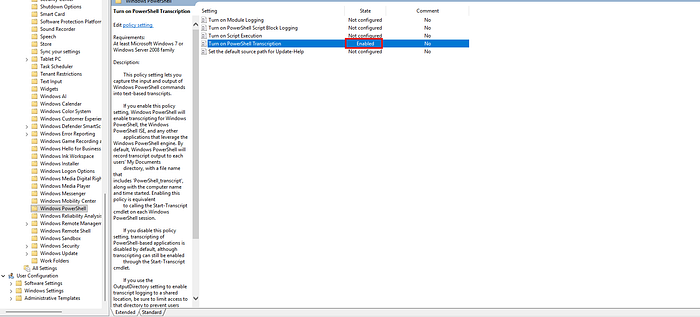
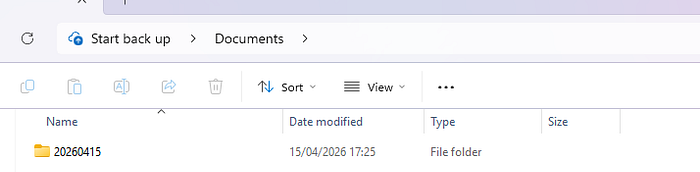
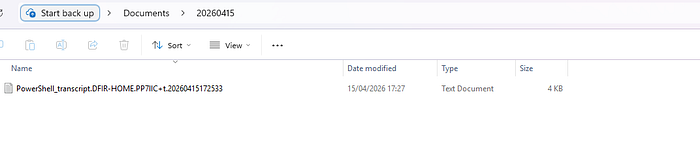
If an OutputDirectory is not explicitly defined in the policy, Windows defaults to writing the transcripts into the user’s profile:
C:\Users\<Username>\Documents\YYYYMMDD\PowerShell_transcript.<Hostname>.<RandomChars>.<Timestamp>.txt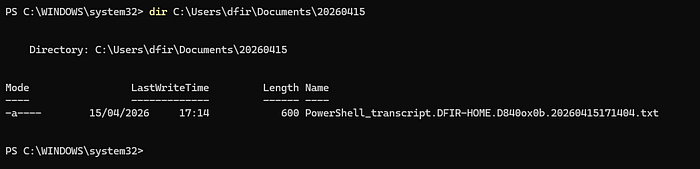
Forensic Note: In mature environments, these logs are forwarded to a secure, write-only network share. If you are examining a standalone host, always check the Documents folder of compromised accounts.
The Forensic Value of Transcripts#
1. Capturing the Output, Not Just the Input#
Script Block Logging will tell you that an attacker executed an encoded command. AMSI might even deobfuscate it for you. However, transcription will show you exactly what the attacker saw. If an adversary uses a tool to dump Kerberos tickets or extract AES keys, the transcript will often contain the actual dumped key material or the success/failure state of the execution. This allows for immediate scoping of compromised credentials without needing to guess whether the attack succeeded.
2. Built-in Session Metadata#
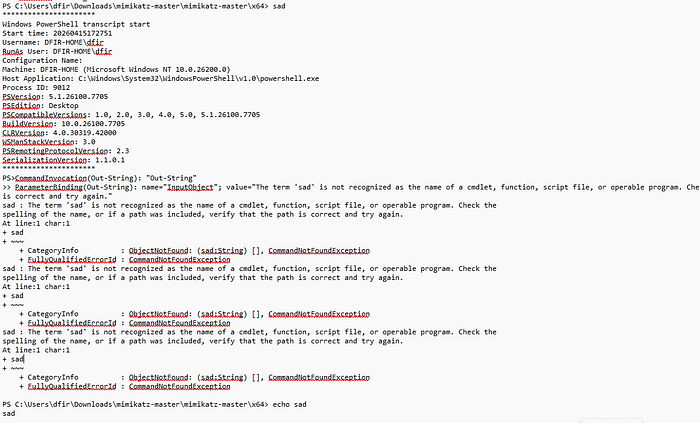
Every transcript file begins with an invocation header that establishes a concrete timeline. This header includes:
- Start time of the session
- Username executing the session (critical for tracking compromised accounts)
- RunAs User (if privileges were elevated)
- Machine name and OS version
- The specific PowerShell version and host application
3. Catching Attacker Mistakes#
Adversaries make typos. They misconfigure parameters, run tools that crash, and query directories that do not exist. These errors rarely trigger high-fidelity alerts in a SIEM, but they are fully documented in a transcript. Analyzing these failed attempts provides deep insight into the attacker’s intent, their toolset, and their familiarity with the victim environment.
4. Bypassing Obfuscation#
Attackers frequently use heavy string manipulation, Base64 encoding, or XOR encryption to bypass static signatures. Because transcription captures the final output sent to the console, it often records the plaintext results of these obfuscated scripts after they have been dynamically evaluated in memory.
Defense Evasion and Artifact Recovery#
Sophisticated actors will attempt to disable transcription by modifying registry keys or explicitly calling Stop-Transcript within their scripts. However, the initial session start and the commands executed prior to the termination are still logged.
If an attacker clears the text files from disk, the standard rules of data recovery apply. Because these are plain text files, carving unallocated space or checking Volume Shadow Copies (VSS) for .txt files containing the string ********************** (the standard transcript header delimiter) is a highly effective recovery technique.
Case Study#
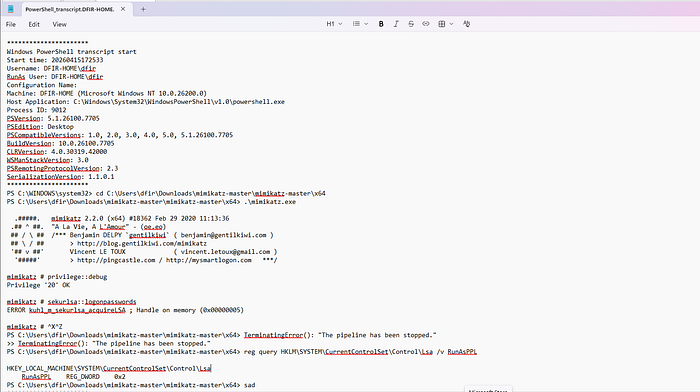
To understand the true value of PowerShell transcription, consider the following raw transcript capturing an adversary’s attempt — and failure — to dump credentials on a compromised host.
The threat actor launches Mimikatz from a staging directory in the user’s profile and attempts a standard credential dump:
mimikatz # privilege::debug
Privilege '20' OK

mimikatz # sekurlsa::logonpasswords
ERROR kuhl_m_sekurlsa_acquireLSA ; Handle on memory (0x00000005)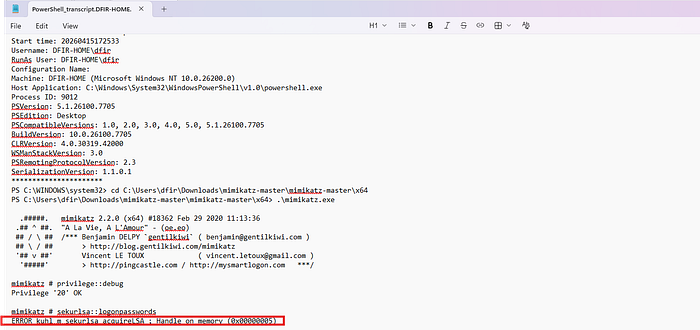
The tool successfully obtains SeDebugPrivilege, but the attempt to read LSASS memory fails with a 0x00000005 (Access Denied) error.
If we were only relying on standard process creation logs (Event ID 4688), we would know Mimikatz ran, but we would not definitively know whether it succeeded. Because we have the transcript, we see the failure. More importantly, we see the adversary’s immediate operational pivot to determine why they were blocked.
The attacker exits Mimikatz and immediately queries the registry to check the configuration of the Local Security Authority (LSA):
PS C:\Users\dfir\Downloads\mimikatz-master\mimikatz-master\x64> reg query HKLM\SYSTEM\CurrentControlSet\Control\Lsa /v RunAsPPL

HKEY_LOCAL_MACHINE\SYSTEM\CurrentControlSet\Control\Lsa
    RunAsPPL    REG_DWORD    0x2
The output returns 0x2. The attacker has just confirmed that LSA Protection (RunAsPPL) is enabled at level 2, effectively blocking LSASS memory access from unauthorized processes — even those running with SYSTEM or Debug privileges.
This sequence represents the gold standard of host forensics. In a single text file, we have captured the tool execution, the exact memory access error, the attacker’s situational awareness check, the defensive control that stopped them, and the operator’s real-time response. That level of narrative clarity is entirely unique to PowerShell transcription.